Proteus F767 Programming Instructions
Too many of Proteus 0.6 with F767 are behaving strangely in terms of SWD programming. Maybe we have a hardware design issue? Maybe we are missing something?
Anyway, it looks like there is a working procedure, using DFU and STM32CubeProgrammer.
Command line option
-
Connect via USB while holding PROG button
-
Make sure you have "STM32 BOOTLOADER" driver not "STM Device in DFU Mode". If necessary, update/install the driver from C:\Program Files\STMicroelectronics\STM32Cube\STM32CubeProgrammer\Drivers\DFU_Driver
-
In cmd.exe, from the C:\Program Files\STMicroelectronics\STM32Cube\STM32CubeProgrammer\bin folder, execute:
- From the same command line prompt, execute:
-
Download the Proteus F7 Firmware bundle 2021.10.08, extract and copy rusefi.hex to the C:\Program Files\STMicroelectronics\STM32Cube\STM32CubeProgrammer\bin folder
-
From the same command line prompt, execute:
Done!
GUI Option
-
Connect via USB while holding PROG button
-
Make sure you have "STM32 BOOTLOADER" driver not "STM Device in DFU Mode". If necessary, update/install the driver from C:\Program Files\STMicroelectronics\STM32Cube\STM32CubeProgrammer\Drivers\DFU_Driver
-
Connect STM32CubeProgrammer via USB, follow this guide to reset nDBANK flag
-
Close STM32CubeProgrammer, unplug the USB cable, re-insert the USB cable, and open STM32CubeProgrammer. STM32CubeProgrammer is finicky; you really have to restart it between steps.
-
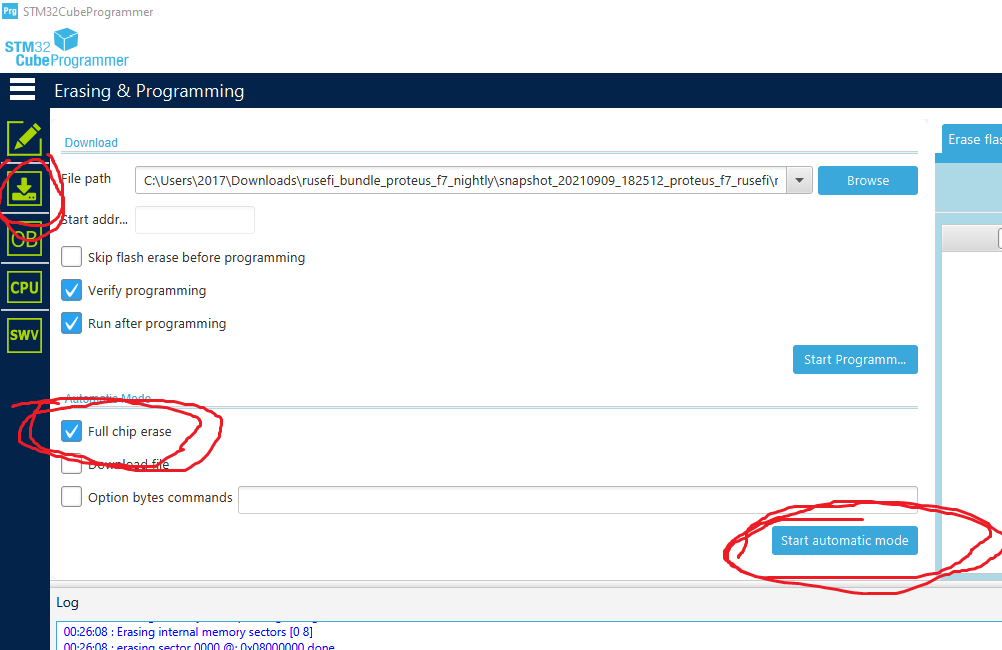
Erase using "Full Chip Erase"
-
Close STM32CubeProgrammer, unplug the USB cable, re-insert the USB cable, and open STM32CubeProgrammer.
-
Program as shown in this picture:
