Unknown Trigger
At the moment the only way to add a new trigger pattern is by having rusEFI developers add a little bit of code into the firmware along the lines of:
s->addEvent(52.960405, T_SECONDARY, TV_RISE);

s->addEvent(122.635956, T_SECONDARY, TV_FALL);

s->addEvent(216.897031, T_PRIMARY, TV_RISE);

s->addEvent(232.640068, T_SECONDARY, TV_RISE);

s->addEvent(288.819688, T_PRIMARY, TV_FALL);

s->addEvent(302.646323, T_SECONDARY, TV_FALL);

s->addEvent(412.448056, T_SECONDARY, TV_RISE);

s->addEvent(482.816719, T_SECONDARY, TV_FALL);
For developers to add the code, we need to know the angles of signal rises and falls.
Step 1: Tooth Count
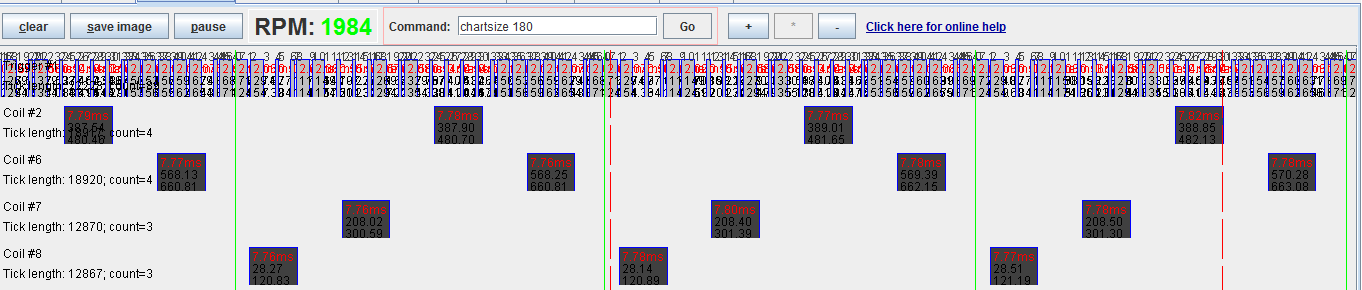
Using rusEFI Console, get a picture of a long-enough engine sniff. On this example you see that a cycle of events consists of 24 teeth.
Step 2: Record Tooth Angles
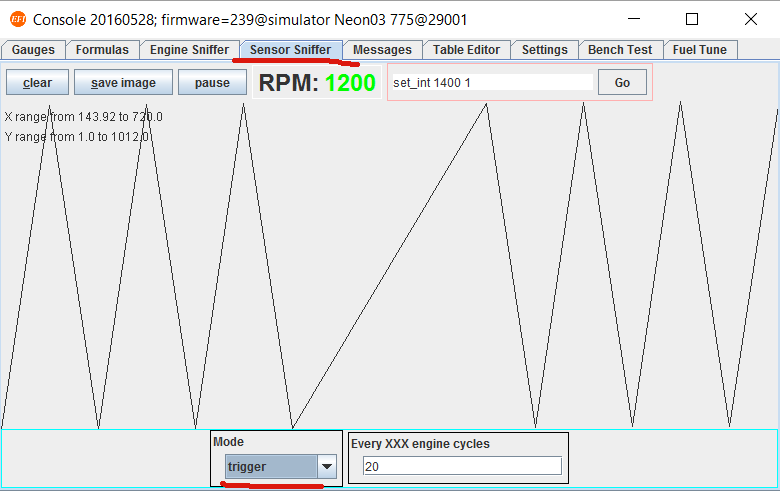
Once the tooth count is known, enable a generic toothed trigger. Set Sensor Sniffer mode to 'trigger' and crank the engine for some time to record specific tooth angles. It is recommended to remove spark plugs from the engine to let engine crank freely and more evenly. Specific tooth angles will be logged under the 'analog_chart' tag.
java -cp rusefi_console.jar com.rusefi.AverageAnglesUtil log.csv
Step 3: Configure Synchronization Gap Parameters
Next you need to find a unique gap in the events to use as the synchronization point, and calculate the ratio between it and the previous gap. Set a minimum and maximum ratio as far apart as possible to allow for uneven rotation speed during cranking, yet close together enough that no other gap could be mistaken for the synchronization point.
Step 4: Locate TDC
Trigger synchronization often does not happen right at TDC. One would need to find out the angle between the synchronization point and the Top Dead Center of cylinder #1.